Docs
AI blur detection
Use a vision-capable model to detect sensitive content and generate blur regions automatically.
Overview
AI blur detection is the product’s clearest differentiator. It turns a manual review task into a guided verification task by suggesting blur regions for sensitive content in a selected frame.
What the feature does
- Sends the current frame to a vision-capable model
- Creates blur regions for detected content
- Labels AI-created regions with a PII classification, such as
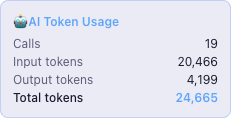
email addressorphone number, so you can review them quickly - Tracks token usage for the current call and the full project
PII categories the AI looks for
The default redaction prompt asks the model to find categories such as:
- full names, usernames, and display names
- email addresses
- phone numbers
- IP addresses, MAC addresses, and hostnames tied to real machines
- passwords, tokens, API keys, secrets, and credentials
- financial data linked to a person
- passport numbers, national IDs, and other government-issued identifiers
- internal system names, device names, and organisation-specific identifiers
Recommended models
The project README confirms these vision-capable models are suitable:
gpt-4ogpt-4.1gpt-4.1-minigpt-4.1-nano
Review checklist
After an AI run:
- Confirm each suggested region covers the sensitive content fully.
- Check the label and source badge.
- Adjust or delete incorrect regions.
- Propagate only the regions that stay valid across following frames.
Why teams like this feature
It compresses the slowest part of screen-recording redaction into one action, then keeps the human in control for verification.